
Late payments are a constant issue for small businesses. QuickBooks reports that almost 60% of invoices go unpaid past their due date. The best invoicing software does more than send bills. It automates reminders, tracks payments, and helps you maintain steady cash flow with less manual work.
This guide reviews the top 10 invoicing tools for 2026, explains who each one suits best, and highlights what to consider beyond features. You will also find practical advice on managing invoice documents, since the way you send an invoice is just as important as its contents.
What Makes a Great Invoicing Tool in 2026
Before choosing a tool, it is worth knowing what sets the best options apart. Here are the factors that matter most for small businesses:
- Billing automation: Auto-reminders for late payments and recurring invoices save hours every month.
- Payment gateway support: Look for tools that accept Stripe, PayPal, ACH transfers, and ideally Apple Pay or Google Pay.
- Tax compliance: If you operate in the UK, MTD (Making Tax Digital) compliance is non-negotiable. Other markets need VAT or GST support.
- Mobile-first workflow: The ability to raise an invoice on a job site, right after completing work, speeds up payment cycles significantly.
- Scalability: A tool that works for a solo freelancer should also support a team of 10 as the business grows.
- Bank reconciliation: Direct bank feeds that automatically match transactions to invoices cut reconciliation time dramatically.
Freemium Warning: What Gets Gated After 10 Clients?
Many invoicing tools offer a free plan but restrict the number of clients, monthly invoices, or payment options as your business grows. Zoho Invoice, Wave, and Square provide real free tiers, but each limits different features. Check the paid plan details before you commit, especially if you expect to have more than 10 active clients.
The 10 Best Invoicing Software Tools for Small Businesses
1. Zoho Invoice: Best Free Invoicing Software for Automation
Zoho Invoice is 100% free, with no hidden fees or client caps. It handles recurring invoices, automated payment reminders, multi-currency billing, and client portals out of the box. The mobile app is strong, and the integration with the broader Zoho ecosystem (Zoho Books, Zoho CRM) makes it a natural fit for businesses already using Zoho products.
- Best for: Freelancers and small businesses that need full automation without a subscription cost.
- 2026 standout feature: AI-driven expense categorization and smart bank transaction matching.
- Limitation: Support response times can be slow, and the interface has a learning curve for non-technical users.
2. FreshBooks: Best for Client Experience and Ease of Use

FreshBooks stands out for its simple, user-friendly design. It provides professional invoice templates, easy payment options for clients, and a dashboard that anyone can use without accounting experience. Built-in time tracking makes it a solid pick for service businesses that bill hourly.
- Best for: Consultants, designers, and service businesses that prioritize client-facing professionalism.
- 2026 standout feature: Automated late payment reminders with personalized client messaging.
- Limitation: Pricing jumps significantly between tiers. The Lite plan limits you to five billable clients.
3. QuickBooks Online: Best for Scaling and Full Accounting

QuickBooks Online is widely used because it covers more than invoicing. It handles accounts receivable, accounts payable, payroll, and tax preparation. For businesses that need more than basic billing and want a full financial overview, it is the most complete option here.
- Best for: Growing businesses that need invoicing and accounting in one platform.
- 2026 standout feature: AI-powered cash flow forecasting and automated bank reconciliation.
- Limitation: One of the more expensive options. Overkill for freelancers who only need basic billing.
4. Xero: Best for Accountant Collaboration
Xero is built around the idea that your accountant and your business should work from the same data. Its real-time collaboration features, clean audit trails, and direct bank feeds make it the preferred tool for businesses that work closely with an external accountant or bookkeeper. Multi-currency support is excellent.
- Best for: Businesses in growth mode that have (or plan to hire) an accountant or financial advisor.
- 2026 standout feature: Xero Go app for capturing receipts via OCR directly on mobile.
- Limitation: No built-in payroll in all regions. Customer support can be slow via email.
5. Wave Accounting: Best Free Tool for Micro-Businesses
Wave provides free invoicing, accounting, and receipt scanning. Instead of charging a subscription, it earns revenue from payment processing fees. If you send a low volume of invoices and are fine with Stripe or PayPal rates, Wave is a good value. It does not offer as much automation as paid tools, but covers the basics reliably.
- Best for: Micro-businesses, side hustlers, and sole traders with straightforward billing needs.
- 2026 standout feature: Wave Money (US only): a business bank account integrated directly with invoicing.
- Limitation: Limited third-party integrations and no time-tracking module.
6. Harvest: Best for Time-Tracking Integrated Invoicing

Harvest links billable hours directly to invoices. You track time on a project, then turn those hours into a professional invoice in one step. It works smoothly with project management tools such as Asana, Trello, and Basecamp, which are well-suited to agencies and project teams.
- Best for: Agencies, developers, and consultants who bill by the hour.
- 2026 standout feature: Forecast integration for capacity planning alongside billing.
- Limitation: Not a full accounting platform. You will need a separate tool for tax preparation.
7. FreeAgent: Best for UK Small Businesses and MTD Compliance

FreeAgent is tailored for UK tax requirements. It is fully MTD-compliant, supports BACS payments, and connects to HMRC for self-assessment and VAT returns. NatWest and RBS business account holders get FreeAgent included with their banking, making it a cost-effective choice for UK sole traders.
- Best for: UK-based freelancers, sole traders, and limited companies.
- 2026 standout feature: Automated self-assessment tax return filing via direct HMRC integration.
- Limitation: Less relevant for businesses outside the UK. International multi-currency support is limited.
8. Bonsai: Best for Agencies and Contract-to-Invoice Workflows

Bonsai covers the full client workflow, from proposals and contract signing to project management, time tracking, and invoicing. Agencies and freelancers who manage contracts and billing together can use Bonsai instead of several separate tools. Its estimate templates and built-in e-signatures set it apart.
- Best for: Creative agencies, freelance consultants, and anyone sending contracts alongside invoices.
- 2026 standout feature: AI-generated contract templates with auto-converted invoices.
- Limitation: Higher pricing compared to simpler tools. Overkill for businesses that only need invoicing.
9. Square Invoices: Best for Businesses with Physical Locations

Square Invoices works well for businesses with both online and in-person sales. It connects with Square’s POS system, so retail and invoice billing are managed together. The free plan offers a lot, and payment reminders are simple to set up.
- Best for: Retailers, tradespeople, and businesses that blend in-person and remote billing.
- 2026 standout feature: Tap to Pay on iPhone/Android for on-site payments linked to invoices.
- Limitation: Payment processing requires Square’s own gateway. Third-party integrations are limited.
10. Stripe Invoices: Best for Developer-Centric or Subscription Businesses

Stripe Invoices is the most flexible option for technical users. It connects to the Stripe API, which suits SaaS businesses, subscription models, and developers who want to customize billing. It supports recurring payments, usage-based billing, and multi-currency invoicing accurately.
- Best for: SaaS companies, subscription businesses, and tech-forward teams.
- 2026 standout feature: Revenue recognition automation for subscription and usage-based billing.
- Limitation: Not designed for non-technical users. Setup requires developer involvement for advanced configurations.
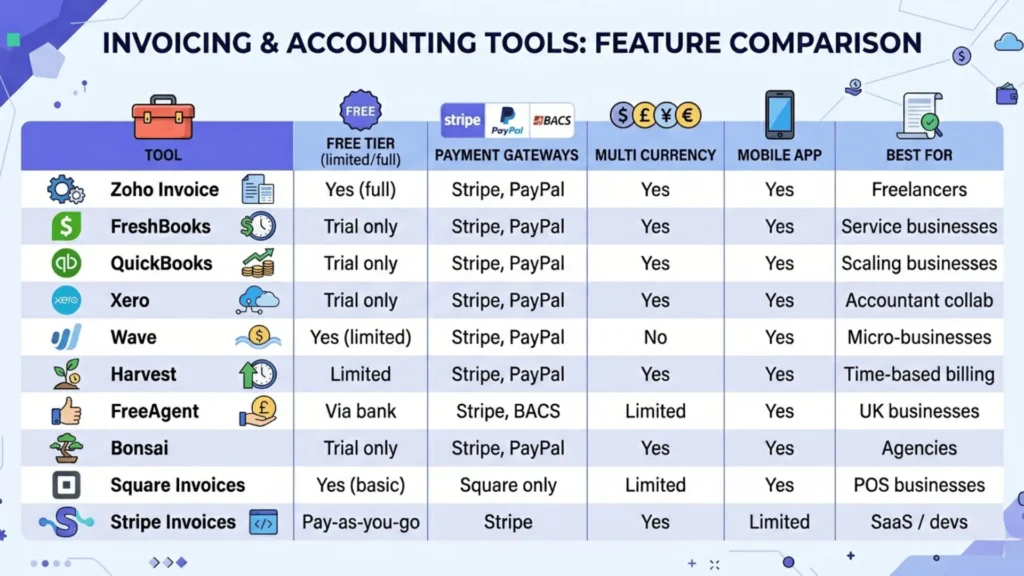
Quick Comparison: Which Tool Fits Your Business?
| Tool | Free Tire | Gateways | Multi Currency | Mobile App | Best For |
| Zoho Invoice | Yes (full) | Stripe, PayPal | Yes | Yes | Freelancers |
| FreshBooks | Trial only | Stripe, PayPal | Yes | Yes | Service businesses |
| QuickBooks | Trial only | Stripe, PayPal | Yes | Yes | Scaling businesses |
| Xero | Trial only | Stripe, PayPal | Yes | Yes | Accountant collab |
| Wave | Yes (limited) | Stripe, PayPal | No | Yes | Micro-businesses |
| Harvest | Limited | Stripe, PayPal | Yes | Yes | Time-based billing |
| FreeAgent | Via bank | Stripe, BACS | Limited | Yes | UK businesses |
| Bonsai | Trial only | Stripe, PayPal | Yes | Yes | Agencies |
| Square Invoices | Yes (basic) | Square only | Limited | Yes | POS businesses |
| Stripe Invoices | Pay-as-you-go | Stripe | Yes | Limited | SaaS / devs |
Optimizing Your Billing Workflow: The Part Most Guides Skip
Software choice is only part of the process. The way you prepare, send, and store invoices affects how quickly you get paid, how professional you look, and how well you meet compliance needs. Here are three practical workflow tips you can use right away.
Tip 1: Send Tamper-Proof Invoices Every Time
Some small businesses still send invoices as Word or Excel files, which are easy to edit. Clients could change payment terms, discounts, or due dates before sharing the document. Even if no one means harm, editable files look less professional than a locked, branded PDF.
Converting invoices or quotes to PDF before sending solves this problem. PDF files preserve your formatting, logo, and layout across devices and look more professional. You can convert files quickly using a Word to PDF tool like FreeConvert, with no software to install.
Tip 2: Keep Invoice File Sizes Small to Avoid the Spam Folder
Large invoice files are a common but overlooked problem. Adding high-resolution logos, project photos, or detailed attachments can push file sizes over 5 MB. Many company email servers block or quarantine large attachments, and some flag big PDFs as spam.
The solution is simple. Compress your PDF invoice to under 1 MB to keep text and logos clear and ensure it passes spam filters and reaches your client. A lossless PDF compressor does this without reducing readability.
FreeConvert’s PDF compressor lets you drag and drop your invoice to reduce file size without losing quality. It works in your browser and does not require an account.
Tip 3: Standardize Your Records Before Tax Season
At year-end, accountants need all records in a consistent format. Many small businesses end up with a mix of JPG receipts, PNG screenshots, PDF invoices, and Excel files. Sending this mix slows down your accountant and increases your costs.
A practical fix is to convert all image-based receipts and documents to PDF and, when possible, merge related files. Most tax authorities require you to keep records for five to seven years. Standardizing to PDF early makes archiving and finding documents much easier.
FreeConvert lets you batch convert JPG, PNG, and other image files to PDF, so you can standardize your records before year-end.
Frequently Asked Questions
What is the best free invoicing software for small businesses?
Zoho Invoice is the best free option, with no client limits or subscription fees. Wave is a good choice for micro-businesses, though its free plan is funded by payment transaction fees. Both provide strong automation and mobile apps.
Which invoicing software is best for freelancers?
The best choice depends on your billing style. If you bill hourly, Harvest or FreshBooks are good options because they include time tracking. For contract-based work, Bonsai combines proposals, contracts, and invoices in one workflow. Zoho Invoice is a solid pick for freelancers who want automation without a monthly fee.
How do recurring payments and billing automation work?
Most invoicing tools let you schedule recurring invoices weekly, monthly, or quarterly with just a few clicks. Once set up, the software sends invoices automatically and follows up with reminders if payments are late. FreshBooks, Zoho, and QuickBooks all do this well.
How long should I keep invoices for tax purposes?
In the UK, you must keep records for at least six years. In the US, the IRS recommends three to seven years, depending on your situation. For most small businesses, keeping seven years of records is a safe policy. Storing invoices as compressed PDFs in a cloud folder like Dropbox or Google Drive is the simplest way to archive them long-term.
What payment gateways should my invoicing software support?
At a minimum, your invoicing software should support Stripe and PayPal. UK businesses should also look for BACS support for direct bank transfers. If you work with international clients, ACH transfers and Wise integration can help lower foreign exchange fees. Apple Pay and Google Pay are becoming standard for client payment pages.
Choosing the Right Tool for Your Business Type
No single invoicing tool fits every business. The best choice depends on your workflow, your clients, and how you plan to grow.
- Solo freelancers on a budget: Zoho Invoice or Wave
- Service businesses billing by the hour: FreshBooks or Harvest
- Growing businesses that need full accounting: QuickBooks Online or Xero
- UK-based businesses with MTD requirements: FreeAgent
- Agencies managing contracts alongside billing: Bonsai
- Businesses with physical and online sales: Square Invoices
- SaaS or subscription-based businesses: Stripe Invoices
No matter which tool you use, your invoice represents your business. A clear, well-sized PDF that reaches your client’s inbox is more likely to get paid quickly than a large file that lands in spam. The software manages the numbers, but how you handle the document can make the difference between getting paid on time or not.

