B-roll quality often separates a polished video from one viewers forget. A single aerial shot, a slow-motion sequence, or a clean lifestyle clip can lift a basic talking-head video. The real challenge is finding the right footage without slowing down your workflow.
Licensing, file formats, and large downloads can slow down every step of the process. This guide highlights the best stock video sites, explains licensing in simple terms, and shows how to get footage ready to use without wasting time.
Understanding Stock Video Quality Before You Search
Stock footage quality varies widely. The platform you choose affects not just cost, but also the look and feel of your videos. Overused clips can make your content feel generic to regular viewers.
Free vs. Premium: Knowing When Each Makes Sense
Free sites like Pexels and Pixabay offer a broad mix of nature, city, and lifestyle footage. These clips are easy to find and useful for many projects, but they are widely used. If you publish often, your viewers may start to notice the same footage in other videos.
Premium platforms such as Artlist and Storyblocks focus on cinematic footage with careful framing, color grading, and a wider range of subjects. Storyblocks updates its library often, so subscribers get access to fresh content that stands out from typical stock footage.
Use free platforms for general B-roll when uniqueness is not a priority. For brand videos, client projects, or any work where standing out matters, premium platforms are the better choice.
AI-Generated Footage: A New Option Worth Knowing
AI video tools like Runway ML now let you generate clips by describing a shot in text. While the quality does not yet match professional footage, these tools are useful for highly specific needs that stock libraries cannot cover, such as unique camera angles or fictional scenes.
AI-generated footage is still developing. For most projects, stock libraries are faster and more reliable. If you need a shot that does not exist elsewhere, AI tools are worth a look.
Decoding Stock Video Licenses Before You Download
Licensing is a common source of mistakes. Using a clip without checking its terms can lead to copyright issues or content takedowns. Below is a simple breakdown of the main license types you will see.
CC0 and Public Domain
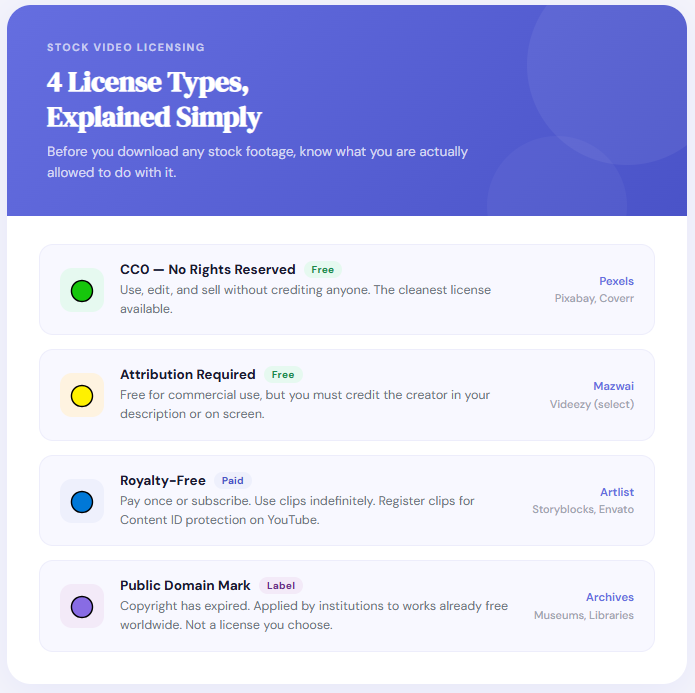
Creative Commons Zero (CC0) is the most permissive license available. You can download, edit, and use the footage in commercial projects without crediting the creator. Pexels, Pixabay, and Coverr all operate primarily under CC0. It is the cleanest option for anyone who wants zero legal friction.
Attribution-Required Licenses
Some free sites, like parts of Mazwai and certain Videezy clips, require you to credit the creator. This usually means adding a text credit in your video description or on screen. Always check the license for each clip before assuming it is CC0.
Royalty-Free (Paid)
Royalty-free means you pay once or subscribe, then use the clip as often as needed without extra fees. Most premium sites use this model. Some require you to register which clips you use in each project, creating a record that helps resolve Content ID claims on platforms like YouTube.
The Unsubscribe Problem
This is a critical detail that subscription-based platforms handle very differently. If you cancel your Storyblocks subscription, clips you downloaded during your active period remain licensed for projects you have already published. Your past work stays protected. Artlist operates similarly, offering perpetual licensing for any downloads made while your subscription was active.
Check each platform’s policy on licensing after cancellation before using their assets in commercial projects. If a clip loses its license when you cancel, it can create problems later.
The Best Free Stock Video Sites
Each platform below fits a specific need. Picking the right one first saves time and avoids unnecessary searching.
1. Pexels
Pexels is the most popular free stock video site. Its library is large, organized, and updated regularly. All clips are CC0, covering lifestyle, travel, food, business, and nature. The search works well, and the 4K selection has improved a lot in recent years.
- Best for: General lifestyle and B-roll content
- License: CC0, full commercial use
- Limitation: High clip exposure across the web; distinctive shots are rare
2. Pixabay
Pixabay offers more than video, including music, illustrations, and vector graphics. It is a good all-in-one resource if you need different asset types. Video quality varies, but the library is huge, and filtering by resolution helps you find what you need faster.
- Best for: Creators who need video, audio, and graphics in one place
- License: CC0, full commercial use
- Limitation: Quality is inconsistent; sorting by ‘Popular’ helps filter out weaker clips
3. Mixkit
Mixkit is free, does not require attribution, and is curated by an editorial team instead of open submissions. This results in clips that are well-lit, properly exposed, and ready to use without much editing. It is a solid choice for polished content on a budget.
- Best for: Polished B-roll without attribution requirements
- License: Mixkit Free License (commercial use permitted, no resale)
- Limitation: Smaller library than Pexels or Pixabay
4. Coverr
Coverr focuses on clean, minimal footage for product demos, SaaS pages, and tech content. The style is modern and simple. All downloads are free under CC0, and the site is fast with an easy-to-use search.
- Best for: Product, tech, and SaaS B-roll
- License: CC0, full commercial use
- Limitation: No mobile app; library size is modest compared to larger platforms
5. Mazwai
Mazwai offers curated cinematic and artistic footage, including slow-motion, dramatic landscapes, and experimental shots. It is a niche platform with a premium feel for a free site. Most clips require attribution, so check each license before using.
- Best for: Cinematic and artistic projects where visual quality outweighs library size
- License: Creative Commons Attribution (most clips)
- Limitation: Small library; attribution required
6. Videezy
Videezy has both free and premium clips. It is best known for motion graphics and overlays like light leaks, particles, and background loops. Editors using Premiere Pro or DaVinci Resolve can find overlay assets here without needing After Effects.
- Best for: Motion graphics, overlays, and abstract visual assets
- License: Mixed; free tier requires attribution, premium clips are royalty-free
- Limitation: Free tier includes watermarked previews for some clips
The Best Premium Stock Video Sites
Paid platforms offer exclusive content, deeper catalogs, and clear licensing. For commercial projects or regular content production, a subscription is often the most efficient choice.
7. Artlist
Artlist is a top pick for YouTube creators and filmmakers who need cinematic footage and licensed music. The subscription includes both video and audio, making it easy to source everything in one place. Anything you download while subscribed stays licensed, even if you cancel later.
- Best for: YouTube creators, commercial video, and projects requiring music and footage from one source
- License: Royalty-free, perpetual post-cancellation
- Limitation: Higher price point compared to generalist platforms
8. Storyblocks
Storyblocks offers unlimited downloads, making it cost-effective for agencies and creators who need a lot of assets. Its Premiere Pro plugin lets you search and add clips directly to your timeline, speeding up the editing process. The library includes 4K footage, motion graphics templates, and green screen assets.
- Best for: Agencies, editors, and anyone who needs a high volume of diverse assets
- License: Royalty-free; post-cancellation terms apply to already-published projects
- Standout feature: Adobe Premiere Pro and Final Cut Pro plugin for direct timeline import
9. Envato Elements
Envato Elements covers the widest range of assets here. Along with stock footage, it includes After Effects templates, motion graphics, Premiere Pro presets, 3D assets, music, and sound effects. For teams working across different formats, a single subscription simplifies licensing. Video quality is high, and the template library is extensive.
- Best for: Multi-format creative projects requiring video, templates, and motion graphics together
- License: Royalty-free with a registered project model
- Limitation: The volume of content can make search results feel overwhelming without specific filters
How to Search Smarter on Any Stock Video Platform
Simply typing a subject and scrolling through results is slow. Adjusting your search approach can save a lot of time.
Use Technical Shot Descriptors
Use specific technical terms in your searches. For example, search ‘drone shot city night’ instead of just ‘city,’ or ‘handheld close-up keyboard’ instead of ‘person working.’ Terms like ‘time-lapse,’ ‘rack focus,’ or ‘slow motion’ help you find footage that fits smoothly into your edits.
Filter by Resolution and Frame Rate
Most sites let you filter by resolution and frame rate. For cinematic edits, 24fps clips match your footage. For slow-motion, look for 60fps or 120fps clips so you can slow them down without losing quality. Mixing frame rates without adjusting them can make your edits look rough.
Using B-Roll to Hide Jump Cuts
Stock footage is useful for hiding jump cuts in talking-head videos. When you cut out a pause or mistake, a hard cut between similar frames can look awkward. Adding a short B-roll clip over the cut smooths the transition. Three to five seconds is usually enough. Platforms like Mixkit and Pexels make this process quick with fast search and downloads.
Reddit Communities as Curation Resources
Communities such as r/videography and r/editors often share lesser-known stock sites that do not show up in most lists. Mazwai, Coverr, and some regional platforms have been found this way. If you are tired of seeing the same free clips everywhere, these forums are worth checking.
Getting Stock Footage Into Your Workflow Without the Headaches
Finding the right clip is only the first step. Many creators lose time dealing with format issues, large files, or upload problems. Here are the most common technical hurdles and how to solve them.
Format Mismatch: MOV and ProRes Files
Premium stock sites often provide footage in MOV or ProRes, which are built for professional editors. Most mobile apps and social platforms expect MP4. Large ProRes files can crash mobile editors or slow down your workflow. Convert clips to MP4 before importing. FreeConvert’s MOV to MP4 tool does this in your browser without extra software.
File Size and Upload Limits
4K stock clips are large. A 30-second 4K file can be 500MB to 2GB or more. Platforms like TikTok, Instagram Reels, and YouTube Shorts have upload limits, and big files slow down uploads and processing. Compress your footage before uploading to keep quality high and file size low. FreeConvert’s video compressor reduces size without visible quality loss.
Trimming Before You Import
Most stock clips are 10 to 30 seconds long, but you usually only need a part of that. Trimming before import keeps your project files smaller, especially on mobile where storage and load times matter. FreeConvert’s video trimmer lets you cut clips quickly without opening a full editor.
Reframing for Different Platforms
If you need to post on vertical platforms like TikTok or Instagram Reels, reframe your 16:9 clips to 9:16 before importing. Most sites do not offer multiple orientations, so cropping is the best option. FreeConvert’s crop tool lets you set the aspect ratio and keep your subject centered.
Extracting Audio from Stock Clips
Sometimes the audio in a stock clip is what you need, like street sounds, rain, or a crowd. Converting the video to MP3 lets you reuse that audio in other projects.
Editing Plugin Workflow
If you edit in Premiere Pro or Final Cut Pro, the Storyblocks plugin lets you search and add clips directly in your editing software. This removes the need to download and import files manually, saving time for fast-paced editors.
Quick Reference: Best Stock Video Sites by Use Case
| Site | Free/Paid | Licence | 4K | Mobile App | Best for |
| Pexels | Free | CC0 | Yes | Yes | General lifestyle B-roll |
| Pixabay | Free | CC0 | Yes | Yes | Variety: video, music, vectors |
| Mixkit | Free | Custom (no attribution) | Yes | Yes | Curated, polished B-roll |
| Coverr | Free | CC0 | Yes | No | Product and SaaS content |
| Mazwai | Free | CC Attribution | Yes | No | Cinematic and artistic clips |
| Videezy | Free + Paid | Mixed | Yes | No | Motion graphics and overlays |
| Artlist | Paid | Perpetual RF | Yes | Yes | Commercial and YouTube creators |
| Storyblocks | Subscription | RF | Yes | Yes | Agencies and high-volume teams |
| Envato Elements | Subscription | RF | Yes | Yes | Multi-format creative projects |
Frequently Asked Questions
What does royalty-free stock video actually mean?
Royalty-free means you pay once (or subscribe) to license a clip and can use it multiple times without paying again per use. It does not mean the footage is free to download. The term refers to the payment structure, not the price.
Can I use Pexels footage in commercial projects?
Yes. Pexels operates under CC0, which permits commercial use without attribution. You can use Pexels clips in client work, advertisements, and monetized YouTube videos without crediting the creator.
What happens to my videos if I cancel my Artlist or Storyblocks subscription?
Both platforms offer post-cancellation protection for already-published projects. Content you have released while your subscription was active remains licensed. However, you cannot download new clips after cancellation, and licensing terms for future projects vary by platform. Always confirm the specific policy before canceling.
What is the best free 4K stock footage site?
Pexels has the largest selection of free 4K footage and the most consistent quality across categories. Mixkit is a strong alternative if you need curated, high-quality clips and do not need the breadth of Pexels’ library.
What format should I download stock video in for editing?
MP4 (H.264) is the most universally compatible format for editing on most platforms and exporting to social media. If you are working in a professional suite like Final Cut Pro, ProRes offers higher color-grading quality but comes with much larger file sizes. For mobile editing or social-first content, MP4 is the practical choice.
How do I reduce stock video file size without losing quality?
Use a lossless or near-lossless compression tool that targets bitrate reduction rather than resolution reduction. Dropping a 4K file from 80 Mbps to 20 Mbps bitrate typically produces no visible quality loss at normal viewing sizes. Tools that simply reduce resolution sacrifice quality in a way viewers can detect.
Picking the Right Platform for Your Project
No single stock video site fits every need. The best option depends on your budget, how much content you produce, and how visible the footage will be in your projects.
Solo creators and bloggers on a budget can cover most B-roll needs with Pexels and Mixkit. Both are free and do not require attribution. For YouTube or branded content, Artlist is worth subscribing to for its clear licensing and reliable quality.
Agencies and high-volume editors should consider Storyblocks. Unlimited downloads and direct integration with Premiere Pro make it more efficient than using multiple free sites. For projects needing templates, motion graphics, and footage under one license, Envato Elements offers the broadest selection.
After finding the right clips, technical details matter. Wrong formats, large files, or incorrect framing can slow you down. Adjust these before importing to keep editing smooth and uploads quick.