

Managing a team without the right tools leads to wasted time, missed steps, and unnecessary frustration. Project management software addresses these issues by providing a shared workspace, clear priorities, and automation that reduces manual work.
This guide reviews 12 leading tools for 2026, explains how to select one that fits your team’s workflow, and highlights file management practices that are often overlooked.
Before You Pick a Tool: Start With Your Methodology
Efficiency starts with your team’s working methodology. Software supports that process, but it does not create it. Before looking at features or pricing, identify the approach that matches how your team works.
Agile methodology suits teams that work in short cycles, called sprints, and continuously refine their output. Software development and product teams live here. Kanban boards work best for teams managing ongoing, flow-based work where tasks move through defined stages. Gantt charts serve project managers who need to plan timelines, map dependencies, and track milestones across a fixed schedule. Waterfall and hybrid approaches sit somewhere in between.
When you understand your team’s workflow, it becomes easier to evaluate which tools will actually help.
Five Criteria That Actually Matter
After matching the tool to your methodology, focus on these criteria:
- Workflow automation depth: Can the tool eliminate at least 20% of your manual status work through triggers and rules?
- Resource allocation visibility: Can you see who is overloaded before deadlines slip?
- Task tracking granularity: Does it support subtasks, dependencies, and project milestones clearly?
- Team collaboration features: Can conversations happen in context, inside the task, rather than buried in email?
- File and asset handling: How does it manage attachments, and what happens when those files are too large to load on mobile?
File and asset handling often gets overlooked, but it has a real impact on team efficiency.
The 12 Best Project Management Tools for Team Efficiency in 2026
1. ClickUp: Best All-in-One Project Management Software
ClickUp earns the “all-in-one” label honestly. Tasks, documents, goals, whiteboards, time tracking, and dashboards all live under one roof. Teams can switch between list, board, Gantt, and calendar views without leaving the platform.
- Best for: Teams that want to consolidate multiple tools into one
- 2026 standout: AI-generated project summaries and automated sprint progress reports
- Limitation: The sheer number of features can overwhelm new users during onboarding
2. Monday.com: Best for Visual Workflow Customization
Monday.com is built around visual clarity. Color-coded columns, drag-and-drop boards, and a no-code automation builder make it one of the most approachable tools for non-technical project managers. Resource allocation views let you spot capacity problems before they become crises.
- Best for: Teams that think visually and want flexibility without engineering involvement
- 2026 standout: AI-powered workload prediction across multiple active projects
- Limitation: Per-seat pricing scales quickly as the team grows
3. Asana: Best for Enterprise-Grade Task Tracking
Asana handles complex task tracking with dependencies, subtasks, and project milestones in a clean, structured interface. Its Timeline view gives you a Gantt-style overview without the traditional complexity. It’s one of the most mature platforms in the space.
- Best for: Mid-to-large teams that need reliable task tracking at scale
- 2026 standout: Goals connected directly to active project milestones for real-time progress alignment
- Limitation: Time tracking requires integrating a third-party tool
4. Jira: Best Project Management Software for Software Teams
Jira is the standard for agile methodology in software development. Sprint planning, backlog management, burndown charts, and Scrum boards are all native features. Its integrations with GitHub, Bitbucket, and CI/CD pipelines make it deeply embedded in engineering workflows.
- Best for: Software and product development teams running agile sprints
- 2026 standout: AI sprint planning that flags scope creep in real-time based on velocity data
- Limitation: Steep learning curve for teams outside of software development
5. Notion: Best for Knowledge Management Plus Task Tracking
Notion combines documentation, databases, and Kanban boards in one workspace. Teams that need both structured documentation and project tracking benefit most. Its flexibility requires an upfront investment in setup.
- Best for: Teams that need structured documentation alongside active project work
- 2026 standout: Notion AI summarizes long project pages and drafts status updates automatically
- Limitation: No native Gantt charts; resource allocation requires workarounds
6. Smartsheet: Best for Gantt Chart-Heavy Project Planning
Smartsheet brings spreadsheet familiarity to serious project planning. Its Gantt charts, dependency mapping, and resource allocation tools make it the preferred choice for project managers who need to plan in detail. Automated project health reports simplify stakeholder communication.
- Best for: Project managers handling complex, timeline-driven work across multiple teams
- 2026 standout: Automated health dashboards that flag at-risk milestones without manual input
- Limitation: Less intuitive for teams accustomed to visual board-style tools
7. Wrike: Best for Cross-Functional Team Collaboration
Wrike balances structure with flexibility well. Gantt charts, Kanban boards, and dashboards are all available, alongside strong proofing and approval workflows that creative and marketing teams particularly value.
- Best for: Cross-functional teams managing both project timelines and content approvals
- 2026 standout: AI-powered risk prediction based on historical project velocity
- Limitation: The interface becomes complex at scale; onboarding for advanced configurations takes time
8. Trello: Best Kanban Board Tool for Small Teams
Trello offers a straightforward approach. Cards move across columns, keeping teams aligned, and setup is quick. Power-Ups add features like calendars, automation, and integrations while keeping the interface simple.
- Best for: Small teams and solo operators who want visual task management without the overhead
- 2026 standout: AI card suggestions based on past project milestone patterns
- Limitation: Not built for complex multi-project resource management or detailed Gantt planning
9. Basecamp: Best for Remote Team Collaboration
Basecamp centers all project communication and tasks in one place, including message boards, to-do lists, schedules, and file sharing. Flat per-team pricing keeps costs predictable as teams grow. Automatic check-ins reduce the need for status meetings.
- Best for: Distributed and remote teams that value simplicity over feature density
- 2026 standout: Async-first check-in workflows that reduce synchronous meeting time significantly
- Limitation: No native Gantt charts and limited workflow automation compared to competitors
10. Microsoft Project: Best for Complex Enterprise Gantt Planning
Microsoft Project remains the benchmark for Critical Path Method planning and Work Breakdown Structure (WBS) management at enterprise scale. It handles resource allocation, capacity planning, and multi-project portfolios with precision that few tools match.
- Best for: Large organizations with dedicated project managers handling complex, multi-phase work
- 2026 standout: Microsoft Copilot integration enables natural language project scheduling
- Limitation: High cost, significant training investment, and unnecessary complexity for smaller teams
11. Teamwork.com: Best for Client-Facing Project Teams
Teamwork is built specifically for agencies and client service teams. Billable time tracking, client portals, and invoicing connect directly to project milestones, making it easier to tie delivered work to revenue.
- Best for: Agencies and consultancies managing multiple client projects simultaneously
- 2026 standout: Per-project profitability tracking that connects time, costs, and deliverables
- Limitation: The interface feels dated compared to newer tools; onboarding can be slow
12. Linear: Best Project Management Software for Product Teams
Linear is fast, keyboard-first, and built for modern engineering and product teams. Cycles (their version of sprints), roadmaps, and an auto-prioritized backlog make it one of the most focused tools on this list.
- Best for: Product and engineering teams that value speed and clarity over feature breadth
- 2026 standout: AI-prioritized backlog based on team velocity and historical throughput
- Limitation: Minimal use case outside software and product development
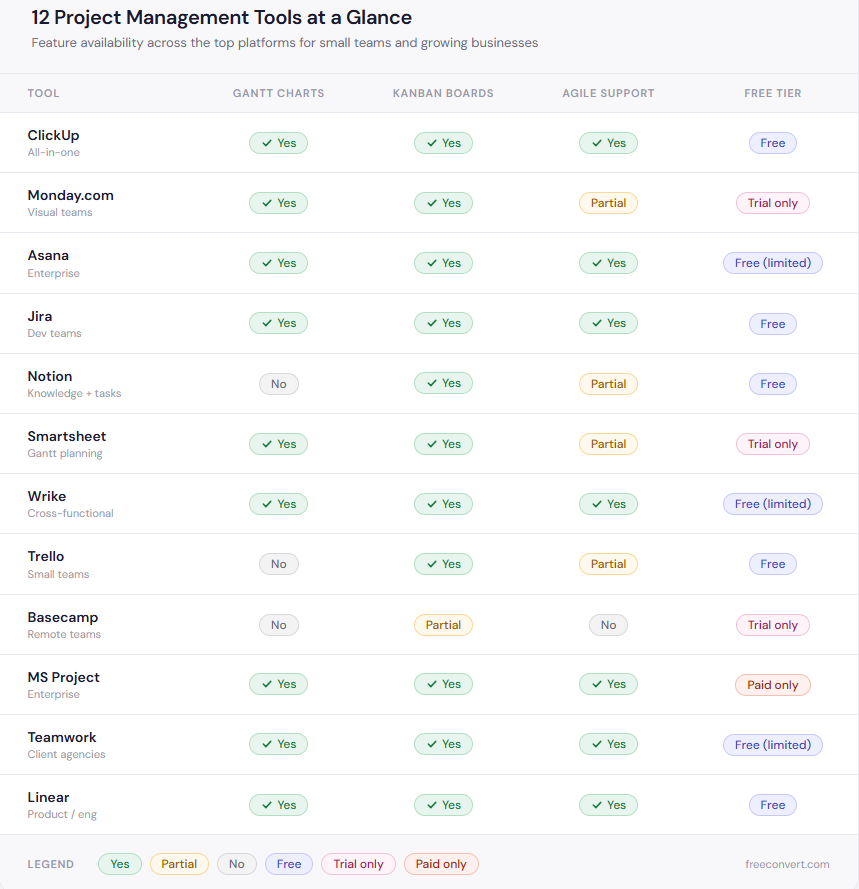
Quick Comparison: Which Tool Fits Your Team?
| Tool | Best For | Gantt Charts | Kanban Boards | Agile Support | Free Tier |
| ClickUp | All-in-one teams | Yes | Yes | Yes | Yes |
| Monday.com | Visual customization | Yes | Yes | Partial | Trial |
| Asana | Enterprise task tracking | Yes | Yes | Yes | Yes (limited) |
| Jira | Software development | Yes | Yes | Yes | Yes |
| Notion | Knowledge + tasks | No | Yes | Partial | Yes |
| Smartsheet | Gantt planning | Yes | Yes | Partial | Trial |
| Wrike | Cross-functional teams | Yes | Yes | Yes | Yes (limited) |
| Trello | Small teams | No | Yes | Partial | Yes |
| Basecamp | Remote teams | No | Partial | No | Trial |
| MS Project | Enterprise planning | Yes | Yes | Yes | No |
| Teamwork | Client agencies | Yes | Yes | Yes | Yes (limited) |
| Linear | Product and engineering | Yes | Yes | Yes | Yes |
The Part Most Project Management Guides Skip
Selecting the right software is only part of improving efficiency. The way your team manages files, documents, and assets within that software is just as important.
Large attachments can slow mobile access. Sending editable files to clients often leads to version control problems. Uncompressed video files quickly use up storage space. These issues are common, and most project management platforms do not address them directly.
Here is how to address each one.
Solve the Mobile Access Problem
Field teams often need to access technical documents from project tasks, whether on site, with a client, or traveling. Large files like a 100MB PDF blueprint do not load reliably on mobile data. This can delay decisions and slow project progress.
Compress PDFs before attaching them to tasks. A compressed document loads quickly on any device and maintains text and diagram quality. FreeConvert’s compress PDF tool works in the browser without requiring an account.
Standardize Client Deliverables
Clients usually do not have access to your internal project workspace. Sharing raw exports or editable files can cause confusion and risk. Editable documents may be changed, display inconsistently, or be forwarded in an unintended state.
Convert internal documents to PDF before sharing them externally. This ensures clients see the intended content and formatting, with no risk of editing. FreeConvert’s Word to PDF converter can lock documents before they leave your team.
Compress Async Video Updates
Distributed teams now use asynchronous video standups as a standard practice. Recording short project updates instead of scheduling calls saves time and accommodates different time zones. However, raw screen recordings and high-resolution videos can be 300 to 500MB each, quickly using up storage space.
Convert raw video to compressed MP4 before uploading to keep your workspace efficient and maintain video clarity. FreeConvert’s video converter manages both format conversion and compression automatically.
Prepare for Tax Season and Audits
Project documentation does not stop mattering once the project closes. Contracts, change orders, approval records, and signed briefs need to be stored in a consistent, retrievable format for years. Most regulatory frameworks require financial and project records to be retained for five to seven years.
Project records often accumulate in mixed formats such as JPG screenshots, DOCX files, XLSX sheets, and scattered PDFs. Converting all records to PDF and organizing them early saves time at year-end and simplifies audits. FreeConvert supports batch conversion from JPG and PNG to PDF, making it easier to standardize records before deadlines.
Your 2026 Project Management Efficiency Checklist
Run through this before committing to a tool or auditing your current setup:
- Does your tool match your team’s methodology: Agile, Kanban, or Gantt-based planning?
- Have you automated at least 20% of routine status reporting?
- Are project milestones visible to stakeholders without requiring manual updates?
- Is resource allocation tracked at a level that prevents team overload?
- Are all task attachments under 5MB for reliable mobile access?
- Are client deliverables sent as locked PDFs rather than editable files?
- Is async video compressed before uploading to your workspace?
- Are your closed project records stored in a consistent, audit-ready format?
Frequently Asked Questions
What is the best project management software for small teams?
ClickUp and Trello are the strongest starting points. Both offer free tiers with enough functionality for small teams to operate without paying anything upfront. ClickUp scales better as headcount grows; Trello is simpler to adopt immediately.
Which tools best support agile methodology?
Jira is the most complete agile platform for software development teams. Asana, ClickUp, and Linear all offer strong sprint planning and backlog management for teams that want agile support without Jira’s complexity.
What is the difference between Gantt charts and Kanban boards?
Gantt charts map tasks across a timeline, showing start dates, end dates, and dependencies between activities. They suit projects with fixed deadlines and sequential phases. Kanban boards organize tasks by stage, showing what is in progress, blocked, or done. They suit ongoing, flow-based work where priorities shift frequently. Many tools now offer both views so teams can switch depending on what they need to see.
How does workflow automation reduce project management overhead?
Automation works through trigger-based rules: when a task status changes, notify the assignee; when a deadline passes, escalate to the project manager; when a milestone is reached, generate a progress report. Tools like Monday.com, ClickUp, and Asana let you configure these rules without writing any code. Teams that use automation well typically cut repetitive administrative work by 20 to 30 percent.
What file formats work best for project documentation?
PDF is the standard for anything shared externally or archived long-term. It preserves formatting across devices, prevents accidental editing, and is accepted by virtually every platform. For active internal collaboration, native tool formats work well. The key habit is converting to PDF before files leave your team and before they go into long-term storage.
Choosing the Right Tool for Your Team
No single project management software fits every team. The right choice depends on your workflow, team structure, and business goals.
Solo operators and small teams do well with Trello or Notion. Growing teams that need full cross-functional visibility tend to land on ClickUp or Asana. Engineering and product teams consistently choose Jira or Linear. Agencies managing client deliverables and billable hours get the most from Teamwork. Large enterprises planning complex, multi-phase programs often need the depth of Microsoft Project or Smartsheet.
The software manages your workflow, but the documents, files, and deliverables you handle are equally important. Keep assets compressed, standardized, and properly formatted to ensure your project management platform delivers real efficiency to your team.

