

Managing a social media agency is about keeping client work organized across many platforms and maintaining a steady flow of content. The main challenge is not creativity, but making sure each post lands on the right channel, on schedule, without mistakes.
Social media schedulers solve this problem. The strongest tools go beyond basic post queues. They bring your content calendar, client approvals, and reporting into one place. For agencies with several clients, the right scheduler turns chaos into a repeatable process.
This guide breaks down the best social media scheduling tools for agencies, what features matter most, and how to get more value from your content after it is scheduled.
What Makes a Social Media Scheduler Worth Using for Agencies
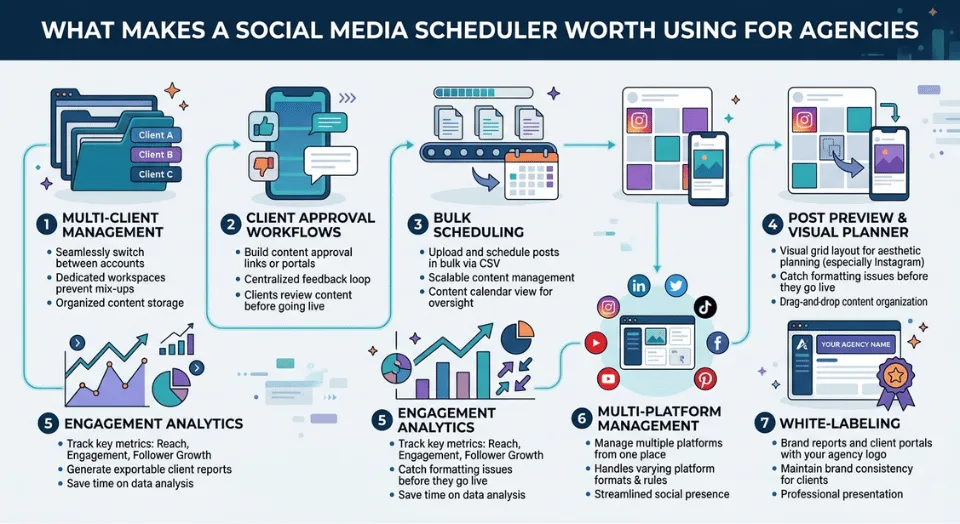
Most scheduling tools are built for solo users or small teams, not agencies. Before you choose a platform, it helps to look at features through the lens of agency workflows.
- Multi-client management: Switching between client accounts should be seamless. A tool with clear workspaces for each client prevents mix-ups and keeps content organized.
- Client approval workflows: Clients expect to review content before it goes live. Built-in approval links or portals cut down on back-and-forth and keep feedback in one place.
- Bulk scheduling: Uploading and scheduling posts one by one is not viable at scale. Look for CSV or bulk-upload support, along with a content calendar view.
- Post preview and visual planner: Previewing posts before they go live helps catch formatting issues, especially for platforms like Instagram, where layout matters.
- Engagement analytics: Reporting is central for agencies. Tools that show reach, engagement, and follower growth in exportable reports save time and make client updates easier.
- Multi-platform management: Each platform has its own formats and rules. The right scheduler lets you manage Instagram, LinkedIn, TikTok, Facebook, Pinterest, and YouTube Shorts from a single dashboard.
- White-labeling: If you deliver reports or client portals, being able to add your agency branding is essential.
The 10 Best Social Media Scheduling Tools for Agency Growth
1. Sendible: Best for White-Labeling and Client Reporting

Sendible is purpose-built for agencies. It offers white-labeled dashboards and reports, meaning your clients see your branding at every touchpoint. The client approval workflow is straightforward: you build the content, send a link, and your client approves or requests changes without ever needing to log in to the platform.
The content calendar provides a clear visual overview of all scheduled posts across all clients. Bulk scheduling via CSV is supported, and the platform integrates with Canva, Google Drive, and Dropbox for asset management.
- Best for: Agencies that want branded client portals and clean approval workflows
- Standout feature: White-labeled reports with custom agency branding
- Pricing: Starts around $29/month; agency plans are higher but built for multi-client management
- Limitation: The interface takes some time to learn for new users
2. Sprout Social: Best for Data-Driven and Enterprise Agencies

Sprout Social is one of the most analytics-rich tools on this list. If your agency sells on the back of reporting and results, the depth of data here is hard to match. You get engagement analytics, competitor benchmarking, social listening, and sentiment analysis, all in one place.
The publishing tools are equally strong. The content calendar supports team collaboration, post preview, and approval routing. Sprout also handles social inbox management, so your team can respond to comments and messages across platforms without switching tabs.
- Best for: Larger agencies that lead with performance data and enterprise clients
- Standout feature: Social listening and competitor benchmarking built into the core platform
- Pricing: Starts around $249/month; positioned at the higher end of the market
- Limitation: Pricing puts it out of reach for smaller agencies or those just getting started
3. SocialPilot: Best for High-Volume Agencies on a Budget

SocialPilot offers strong features for the price. Bulk scheduling, a visual calendar, client approval links, and white-labeled reports are all included. For agencies handling many accounts on a budget, it is one of the best value options.
It supports Facebook, Instagram, LinkedIn, TikTok, Pinterest, Google Business Profile, and more. Auto-posting is reliable, and the interface is simple enough for quick onboarding.
- Best for: Growing agencies that need agency-grade features without enterprise pricing
- Standout feature: Bulk scheduling with CSV upload and white-label reporting
- Pricing: Agency plans start around $100/month for up to 30 accounts
- Limitation: Analytics depth is not as strong as Sprout Social or Iconosquare
4. Loomly: Best for Content Ideation and Team Collaboration

Loomly helps teams create content, not just schedule it. It suggests post ideas from trending topics, RSS feeds, and social events, which is helpful when working with clients in different industries.
The visual planner offers a clear calendar with drag-and-drop scheduling. Post previews show exactly how content will look on each platform. The approval workflow is straightforward, so even less tech-savvy clients can use it easily.
- Best for: Content-focused agencies that want ideation support alongside scheduling
- Standout feature: Built-in post idea engine and platform-specific post preview
- Pricing: Plans start around $42/month; scales by number of accounts
- Limitation: No social listening or advanced competitor analysis
5. Agorapulse: Best for Social Inbox and Engagement Management

Agorapulse brings scheduling and social inbox management together. For agencies handling both publishing and community engagement, it keeps everything organized. You can assign comments and messages to team members and track response times for client reporting.
The content calendar and auto-posting tools work well. Reporting is strong, with exportable PDF reports ready for clients. The free plan limits the number of profiles you can connect.
- Best for: Agencies that handle both content publishing and community management
- Standout feature: Unified social inbox with team assignment and response tracking
- Pricing: Free plan available; paid plans start around $69/month
- Limitation: White-labeling is only available on higher-tier plans
6. Buffer: Best for Lean Agencies That Need Clean Auto-Posting

Buffer is a straightforward tool for agencies with small teams and simple workflows. It delivers reliable auto-posting across major platforms without extra complexity. The interface is intentionally minimal.
Buffer supports Instagram, Facebook, LinkedIn, Pinterest, TikTok, and YouTube. There is no built-in client approval, so it suits agencies where the team handles publishing. The free plan works for very small operations.
- Best for: Small or lean agencies with streamlined internal workflows
- Standout feature: Simple, fast multi-platform scheduling with a clean visual planner
- Pricing: Free plan available; paid plans from around $6/month per channel
- Limitation: No client approval portal or white-label reporting
7. Hootsuite: Best for Agencies Already in Enterprise Ecosystems

Hootsuite has a long track record in social media scheduling and is widely used by enterprise agencies. It integrates with CRM systems, analytics tools, and project management software. For agencies working within larger business ecosystems, its compatibility stands out.
Bulk scheduling, content calendar management, team collaboration, and advanced analytics are included. TikTok, Instagram Reels, and YouTube Shorts can be scheduled directly through the API.
- Best for: Enterprise agencies embedded in large business tech stacks
- Standout feature: Deep third-party integrations and enterprise-grade access controls
- Pricing: Starts around $99/month; enterprise pricing is custom
- Limitation: Interface can feel dated compared to newer tools; pricing is steep for smaller agencies
8. Later: Best for Visual-First and Instagram-Focused Agencies

Later was designed for Instagram, and it excels at visual planning. The drag-and-drop grid preview lets you see your client’s feed layout before publishing. It also supports Pinterest, TikTok, LinkedIn, and Facebook.
The media library makes it simple to store and reuse assets across campaigns. For agencies working with brands where visual consistency matters, Later is a strong choice.
- Best for: Agencies with visual-first brands or strong Instagram and Pinterest presence
- Standout feature: Drag-and-drop Instagram grid planner with full post preview
- Pricing: Free plan with limited posts; paid plans start around $18/month
- Limitation: Less suited to agencies with heavy LinkedIn or Twitter/X focus
9. CoSchedule: Best for Content Calendar and Marketing Workflow Management

CoSchedule combines social media scheduling with marketing project management. Your content calendar can include blog posts, email campaigns, ad launches, and social posts in one place. For agencies managing integrated campaigns, this unified view is valuable.
The drag-and-drop calendar makes rescheduling simple. ReQueue, the automation feature, recycles evergreen content to fill gaps in your schedule.
- Best for: Agencies managing integrated campaigns across multiple content types
- Standout feature: Unified marketing calendar with ReQueue automation for evergreen content
- Pricing: Free plan available; paid plans start around $29/month
- Limitation: Social analytics are less detailed than dedicated analytics tools
10. Iconosquare: Best for Analytics-First Agencies and Competitor Benchmarking

If your agency relies on client reporting and performance data, Iconosquare is worth a look. Its analytics cover engagement by post type, follower growth, best posting times, and competitor benchmarking.
The scheduling tools include a visual planner and auto-posting. Iconosquare stands out for its data. Custom PDF reports and white-labeled dashboards help you present results professionally to clients.
- Best for: Agencies that lead with analytics and performance-based client reporting
- Standout feature: Competitor benchmarking and deep engagement analytics
- Pricing: Plans start around $59/month; custom pricing for agencies
- Limitation: Fewer integrations compared to Hootsuite or Sprout Social
Quick Comparison: Which Tool Fits Your Agency?
| Tool | Free Tier | White-label | Bulk Scheduling | Client Approval | Best For |
| Sendible | No | Yes | Yes | Yes | Full-service agencies |
| Sprout Social | Trial | No | Yes | Yes | Enterprise / data-driven |
| SocialPilot | Trial | Yes | Yes | Yes | Budget-conscious agencies |
| Loomly | Trial | No | Yes | Yes | Content teams/ideation |
| Agorapulse | Free (limited) | No | Yes | Yes | Social inbox management |
| Buffer | Yes (limited) | No | Yes | No | Lean agencies |
| Hootsuite | Trial | No | Yes | Yes | Enterprise stacks |
| Later | Yes (limited) | No | Yes | No | Visual-first brands |
| CoSchedule | Trial | No | Yes | Yes | Marketing project mgmt |
| Iconosquare | Trial | No | Yes | No | Analytics-first agencies |
Maximizing Content ROI: The Repurposing Workflows Most Agencies Skip
A good scheduler takes care of distribution, but how you prepare content before scheduling matters just as much. Repurposing is one of the most effective strategies agencies often overlook.
For example, a long-form client video can be broken into several shorter clips. Formatting each for the right platform increases the value of every asset without raising production costs.
Strategy 1: Create Thumb-Stopping GIFs from Video
Short video clips get scrolled past. A well-timed GIF loops instantly, requires no sound, and delivers a message in seconds. For X (formerly Twitter), email newsletters, and LinkedIn posts, a three-second looping GIF pulled from a longer video can significantly outperform a static image or a video link.
The key is to extract the most visually striking three to five seconds from a long-form video and convert it to GIF format. Free tools like FreeConvert’s video to GIF converter let you do this directly in the browser without installing software. Once converted, the file is ready to upload into your scheduler for any platform that supports animated content.
Strategy 2: Turn Static Product Images into Animated Content
Static images are easy to ignore in a busy feed. Combining two or three product photos into a single lightweight GIF adds motion without the file size burden of a video. For e-commerce clients or product launches, this technique increases the chance of stopping a scroll without requiring a full video production.
An image to GIF tool lets you combine multiple images into a looping animation in minutes. The result is a single file that can be scheduled across all platforms, which saves time compared to managing separate image carousels on each network.
Strategy 3: Keep File Sizes Inside Platform Limits
Every social platform has file size limits for uploads, and schedulers inherit those limits. X (Twitter) caps GIF uploads at 15MB. Instagram and LinkedIn have their own constraints for videos and animations. An oversized file either fails to upload or gets rejected by the scheduler before it even reaches the platform.
Before uploading, run your GIF or video through a compression tool to keep file sizes within spec without sacrificing visible quality. FreeConvert’s compress tool handles this directly in the browser. It is a small step that prevents wasted time troubleshooting failed uploads at the last minute.
Short-Form Video in 2026: What Your Scheduler Needs to Support
TikTok, Instagram Reels, and YouTube Shorts are not optional extras for most clients anymore. They are central channels. The challenge for agencies is that each platform has distinct technical requirements: aspect ratios, caption length limits, hashtag conventions, and file format preferences all differ.
The schedulers that handle this well let you write one piece of copy and then adapt it per platform from a single editing view. You can trim a caption for TikTok, keep the longer version for LinkedIn, and flag the correct 9:16 ratio for Reels versus 1:1 for a standard feed post, all without duplicating your work.
AI-assisted caption writing and optimal posting time predictions, features now built into Loomly, Sprout Social, and Hootsuite, are genuinely useful here. They will not replace your team’s judgment, but they speed up the routine parts of content production.
The Agency Growth Checklist: What to Verify Before You Commit
Before signing up for any tool, run through this checklist. These are the questions that matter most once you are past the free trial and actually managing client workloads at scale.
- Does it support multi-user access with role-based permissions?
- Can clients approve content without needing a platform login?
- Does it offer white-labeled reports you can send under your agency brand?
- Is there a visual content calendar with drag-and-drop rescheduling?
- Can you upload content in bulk via CSV or batch import?
- Does it include a post preview for each platform before publishing?
- Are engagement analytics and competitor benchmarking available?
- Does it support direct API posting to TikTok, Reels, and YouTube Shorts?
- Is there a built-in asset library for storing and reusing media across campaigns?
Before uploading, check that your media assets are optimized. Oversized images or GIFs can fail to upload or trigger errors that waste time. Compressing and formatting files in advance prevents these issues.
Frequently Asked Questions
What is the best social media scheduler for agencies in 2026?
Sendible and SocialPilot are two of the strongest options for most agencies. Sendible leads on white-labeling and client portals. SocialPilot offers the best value for high-volume, budget-conscious operations. For data-driven agencies, Sprout Social and Iconosquare are worth the higher investment.
What is bulk scheduling, and why does it matter for agencies?
Bulk scheduling lets you upload multiple posts at once, usually via a CSV file, and have them distributed across your content calendar automatically. For agencies managing dozens of accounts, it eliminates the need to schedule each post individually, saving significant time each week.
How do I manage multiple clients without content getting mixed up?
The best tools give each client a separate workspace or profile group with its own login, assets, and calendar. Sendible, SocialPilot, and Agorapulse all handle this cleanly. The risk of cross-posting increases when you rely on workarounds, so proper workspace separation is worth prioritizing from day one.
Which platforms support direct API scheduling for Reels and TikTok?
Hootsuite, Sprout Social, Loomly, Agorapulse, and Later all support direct API posting to Instagram Reels and TikTok as of 2026. Always check that the tool you choose has current API access for your priority platforms, as these integrations can change when platforms update their policies.
How do I repurpose video content for multiple platforms efficiently?
The most practical approach is to extract the strongest short clip from your long-form video, convert it to a format that suits each platform (GIF for email and X, MP4 for Reels and TikTok, square crop for LinkedIn), and schedule them across channels in one batch. Tools like FreeConvert help with format conversion and file optimization before you upload.

